v1.0 Beta · Now shipping

Intelligence
for sound.

Zenphony builds tools that help producers, engineers, and composers hear more clearly, decide faster, and trust the mix in front of them.

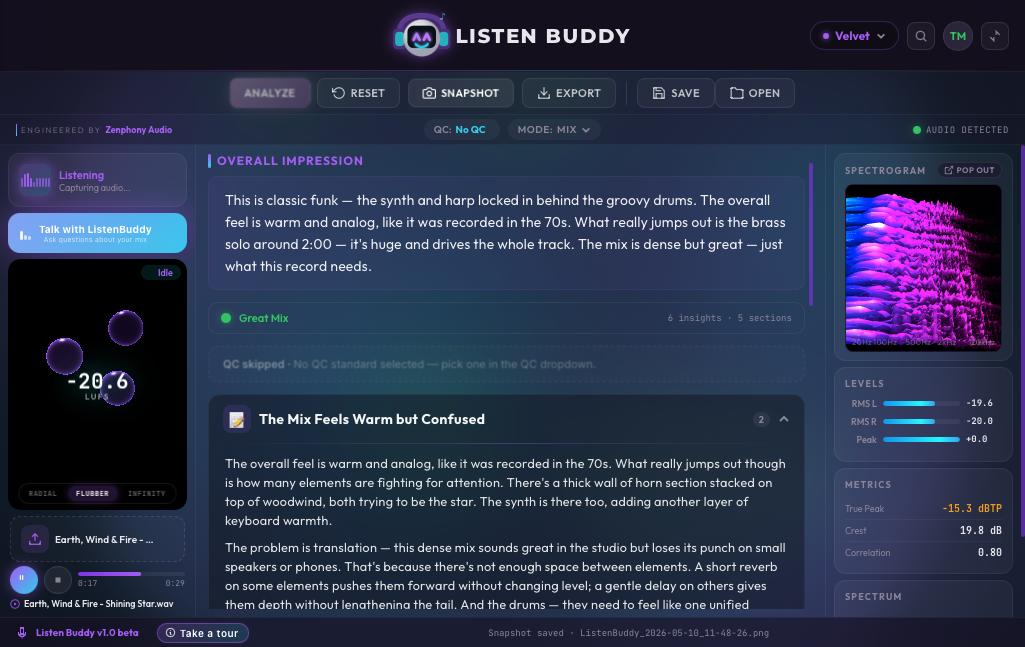
Listen Buddy plugin — analysis view (Velvet theme, funk track)
Trusted by engineers, composers and post houses
Atlas Mastering
Northway Studios
Polyphon Records
Vesper Post
Field Sound Co.
Helix Audio
Lighthouse Mix
Roomtone
Atlas Mastering
Northway Studios
Polyphon Records
Vesper Post
Field Sound Co.
Helix Audio
Lighthouse Mix
Roomtone
Listen Buddy
The plugin · v1.0 BETA

A second pair of ears, trained on yours.

A mix companion that sits in your DAW, reads the signal in real time, and tells you what's happening in the spectrum: plain English, with the dB and kHz to back it up.

Inside the analysis engine

Explore Listen Buddy's analysis engine.

Open real analysis‑style cards inside an interactive plugin preview. Browse mix, mastering, production, and broadcast feedback the way it appears inside Listen Buddy.

Inside the analysis

Hear what's there.
Decide what's next.

Listen Buddy reads the same four signals a great engineer does: tonal balance, dynamics, stereo image, translation. It surfaces them as plain‑language insight, with the dB and kHz values right next to the words.

Mode
Mix · Master · Film
Six listening modes calibrated to context
Reference
Curated · Custom
Match against tracks that already translate
Latency
Real‑time
Inline DSP, no offline render required
Format
VST3 · AU · AAX
Native Apple Silicon · macOS 13+
Sample insight · Pop / R&B mix · 96 kHz

Punchy mix overall. The low end has nice weight on the kick and 808, and the vocal sits forward without getting harsh. Air on the cymbals could use a small bump around 12 kHz, and the bus compressor could be backed off ~1 dB during the chorus.

Listen Buddy · Mix mode · QC reference: Spotify
Four ears, two homes

Meet your listening crew.

Listen Buddy isn't one voice — it's four. Two who live on your laptop and never leave the room. Two who live in the cloud with deeper memory and a wider library. Pick the buddy that fits the work, or let the plugin pick for you.

Local · on your machine
runs on Apple Silicon & modern x86 · zero data leaves your DAW · works offline
Velvet
local · purple

The patient one. Wide ears, warm read.

Velvet is the buddy you crack open at 2am when the mix is mostly there and you just need someone calm to confirm it. Tonal balance, low‑end weight, vocal sit. Won't argue, won't oversell. Default for Mix and Master modes.

  • strengthsbalance · low end · vocal sit
  • tonecalm · confirming
  • latency~80 ms first read
Amarillo
local · gold

The bright one. Quick draw, sharp ear.

Amarillo flags problems. Sibilance at 6k, a 380 Hz resonance you stopped hearing two hours ago, a kick that's clipping your bus. Fast, blunt, useful. The buddy you bring to the polish pass.

  • strengthsissue detection · transient work
  • tonedirect · prescriptive
  • latency~60 ms first read
Cloud · the heavier model
deeper context · larger reference library · remembers your sessions · needs a connection
Rosso
cloud · coral

The opinionated one. Holds a position.

Rosso has heard a lot of records. When you ask whether the bridge is working, Rosso names the reference, points to the bar, and tells you what would change. Push back and Rosso pushes back. Best for mastering, A/B, and arrangement notes.

  • strengthsreferences · arrangement · A/B
  • toneopinionated · conversational
  • modelcloud · deep context
Verde
cloud · green

The studious one. Reads the spec sheet.

Verde knows the standards. Spotify −14 LUFS, Apple Music, Netflix −27, ATSC A/85, EBU R128. Verde checks your mix against the destination and tells you exactly where it's out — true peak, integrated loudness, dialnorm, the works. Best for delivery and broadcast.

  • strengthsdelivery specs · loudness · QC
  • toneprecise · technical
  • modelcloud · standards-aware
What it does

Reads what's there. Knows what's next.

Six listening modes calibrated to the work in front of you. Ten broadcast and streaming standards you can measure against. A reference library that knows the records that already translate. And a conversation that remembers what it just heard.

Tonal balance

A spectral read across the full range, weighted to genre and reference. See where the low‑mids are crowded, where the air is missing, and what to nudge. In dB, not adjectives.

Dynamics & loudness

Integrated LUFS, true peak, and crest factor, calibrated against streaming targets. The pearl meter shows compression character at a glance, not just a number.

Stereo image

Phase, correlation, and width over time. Catches the moment a chorus pulls left, or a synth pad collapses to mono on a phone speaker, before your reference listener does.

+0.18 corr112°center stable

Issue detection

Sibilance on a soloed vocal. A resonant peak around 380 Hz. Inter‑sample peaks above 0 dBTP. Listen Buddy flags them with a frequency and a suggested move.

⚠ 5.6 kHz sibilance⚠ +0.3 dBTP

Reference matching

Drop in a track that already translates. Listen Buddy maps its tonal curve, dynamics, and stereo profile onto yours, and tells you the gap. Not "close enough", but "−1.4 dB low‑shelf at 80".

QC: SpotifyQC: Apple MusicCustom

Talk to your mix

Ask a question, like "is the vocal too forward in the bridge?", and Listen Buddy answers from what it heard, not from a generic style guide. It's a conversation, with frequencies.

Listen for sibilance on the soloed vocal
Talk to your mix

Keep the conversation going. Follow up, push back, get unstuck.

The Listen Buddy chat is a resource to go to when you have questions about mixing techniques, your DAW, and your plugins. It’s also your sounding board. Pull on a thread from your last analysis. Ask the “what if” question. Whether you need a creative spark or a technical sanity check, Listen Buddy is always around to talk it through.

▎ Free A generous monthly ceiling of Listen Buddy chat on the free tier. Unlimited on every paid plan.
Listen Buddy · chat
Mix mode · listening to oleo_RVG_velvet.wav
You said the chorus felt “crowded.” Crowded how? I keep hearing it, can’t place it.
Maya · follow-up on last analysis
Three things are sharing the same shelf. The lead vocal sibilance, the snare top, and the hi-hat are all parked between 5–7 kHz. None of them are loud on their own. Together they make a wall.
When I called it crowded, I meant: nothing has its own room up there. The verse breathes because the hat drops out. The chorus doesn’t get that breath.
Listen Buddy
What if I leaned into it instead? Made the chorus feel deliberately busier than the verse?
Maya
That’s a real choice. A lot of records do exactly that. The trick is making it feel intentional, not accidental. Right now your chorus reads as “louder verse,” not “different section.”
If you’re going busier, give the listener a signpost: a tonal shift, a stereo widen on the hat, a synth pad arriving on the downbeat. Otherwise the energy lifts but the ear doesn’t know why it lifted.
Listen Buddy
Pad idea is interesting. What would you reach for?
Maya
Something that lives under the vocal, not next to it. A warm sine-ish pad sitting around 200–400 Hz, low in the mix, wide. It’d give the chorus weight without adding to the 5 kHz traffic jam.
Listen Buddy · Pin to session
Okay, I’m gonna try that. Anything else jumping out before I dive in?
Maya
Listen Buddy · thinking…
|Ask anything about the audio…
Six listening modes

Calibrated to context.

The same mix sounds different through a film mixer's ears than through a pop engineer's. Listen Buddy switches its weighting (targets, references, language) to match what you're actually doing.

🎚
Mixing
Balance, clarity, and translation across systems
🎛
Production
Instrumentation, arrangement, and density
👑
Mastering
Final polish, consistency, and streaming targets
🎙
Podcast
Speech intelligibility, presence, and dialogue level
🎬
Film
Dialogue, music, effects, and the silence between
📣
Commercial
Attention‑first sound for spots and short‑form
Pricing

Pay for the minutes you listen.

Every paid plan ships with all six listening modes and unlimited Listen Buddy chat — the free tier gets a generous monthly ceiling. You're paying for analysis minutes: the cloud‑side compute that powers deeper insight and reference matching..

Monthly
Yearly −12%
Free
$0/ month
Hear what Listen Buddy hears, on a single mix.
10analysis min / mo
  • All six listening modes
  • Generous monthly Listen Buddy chat ceiling
  • Custom references
Basic
$7.99/ month
For producers shipping their own work.
60analysis min / mo
  • All six listening modes
  • Unlimited Listen Buddy chat
  • Reference library
Max
$69.99/ month
For mastering engineers and post houses.
700analysis min / mo
  • All six listening modes
  • Unlimited Listen Buddy chat
  • Custom references & presets
About Zenphony

Built by people who make records.

Zenphony Audio was founded in 2025 by two musicians, producers, engineers, and composers who love every part of the craft. We track, write, mix, score, and master, and we build the tools we wished we had at 2 a.m. when the work is close and the room has gone quiet.

Made for working sessions

Built calm, by people who live in sessions. No flashy meters, no interruptions, no breaking the moment when an idea finally lands. Just steady ears for the long stretch.

Across the whole chain

We work in pop, R&B, film, and everything that bleeds between them. Tracking, production, mix, score, master. The tools we ship reflect that range, because the work does.

One product at a time

One thing, finished, before we start the next. Listen Buddy is the first, shaped in real sessions over real records. The next one is already taking shape in the room.

Ready when you are

Hear your mix, honestly.

Drop Listen Buddy on the bus, hit Analyze, and read the impression that comes back. If it tells you something you didn't know, keep it.